Desktop Authority Management Suite

Centralized, secure and consistent desktop management of the Windows user environment.

Desktop Authority Management Suite enables admins to proactively provision and manage the Windows user environment. With the suite, you can easily create a secure, consistent environment for each user; automatically package and test applications consistently; and ensure that applications run with only the privileges and access needed.

Desktop Authority Management Suite is compromised of three solutions: Desktop Authority, Privilege Manager and MSI Studio.

The Desktop Authority Management Suite provides Windows user environment management across:

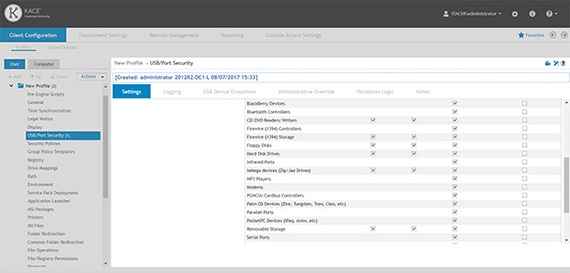
  • Devices: Simplifies the hassle of securing devices by customizing the environment at first login, configuring the firewall and managing browser security for physical, virtual and published Windows environments. Centrally controls access to external devices to secure data.
  • Applications: Ensures applications remain available and ready by configuring shortcuts, customizing settings, maintaining access to network resources and providing only the administrative privileges needed. Packages applications easily for seamless installation.
  • Identities: Shapes the user environment to the user identity, instantly configuring drives, printers, folders, shortcuts, Outlook profiles, administrative privileges and more, tailored to the user’s unique needs.

Features

The Desktop Authority Management Suite is the right choice if you need user environment management functionality to complement your existing client management solution.

  • Real-time targeting engine: Desktop Authority and Privilege Manager tailor settings, administrative privileges and configurations by user, computer, network address or dozens of other criteria using the suite’s patented Validation Logic targeting engine. This simplifies initial provisioning and environment setup, enforces user access policies, and automatically updates configurations and settings. Learn more »
  • User environment configuration: Desktop Authority configures access to company resources, manages security settings, configures Outlook profiles and Office settings, and customizes registry settings. Learn More »
  • Environment security: The Desktop Authority Management Suite prevents security problems where they’re most likely to occur: at the desktop. Set security policies, control administrative privileges,manage the firewall, lock inactive computers and manage browser security and privacy settings for machines, applications and data.
    Learn more »
  • Windows Installer packaging: MSI Studio easily creates, edits and tests MSI installers to ensure painless installation in the Windows environment. Learn more »
  • Remote user support: Desktop Authority’s ExpertAssist remote management system manages more than 40 computer tasks without interrupting the user, including accessing system information, controlling processes, running remote command-line commands, and copying files. Learn more »
  • Powerful auditing of settings and activity: Use the robust reporting Desktop Authority and Privilege Manager to audit user login activity and elevated privilege activity. You can easily track changes as well as generate a breadth of reports. Learn more »

Benefits:

  • Customize the User Environment: Let the Desktop Authority Management Suite—through its patented Validation Logic—target, configure and manage a unique user environment and user administrative privileges, no matter where users are or whether they are on a physical or virtual desktop.
  • Simplify Windows Administration: The Desktop Authority Management Suite provides centralized management that makes it easy to deliver a secure and consistent user environment.
  • Eliminate Login Scripting: Eliminate the need to write, test and maintain login scripts to ensure each user's environment has the correct mix of hardware, applications and permissions. Eliminating script execution makes the login process as fast as possible for your users.
  • Maintain Control: Let Desktop Authority Management Suite track and report on usage to ensure that all computers, applications and user sessions are secure and authorized, and that users and applications have only the administrative privileges needed.
  • Reduce service requests: Proactively manage user configurations and administrative privileges and optimize them for productivity while maintaining security. Providing users with the right access to resources from the start ensures that they can be productive and IT is not reacting.

Sys Reqs

Desktop Authority Standard

Supported operating systems

The Desktop Authority Web Console (Manager) can be installed on any of the following servers:

  • Microsoft Windows Server 2003 & R2 Standard/Enterprise Edition with SP2 (including 64-bit)
  • Microsoft Windows Server 2008 Standard/Enterprise (including 64-bit)
  • Microsoft Windows Server 2008 R2 Standard/Enterprise

The Desktop Authority client side components can be installed on any of the following clients:

  • Microsoft Windows XP Service Pack 2 (SP2) or greater (including 64-bit)
  • Microsoft Windows Vista Service Pack 1 (SP1) or greater (including 64-bit)
  • Microsoft Windows 7 (including 64-bit)
  • Microsoft Windows Server 2003 & R2 Standard/Enterprise Edition with SP2 (including 64-bit)
  • Microsoft Windows Server 2008 Standard/Enterprise (including 64-bit)
  • Microsoft Windows Server 2008 R2 Standard/Enterprise

Desktop Authority server components can be installed on a domain controller; however the best practice recommendation is to install Desktop Authority on a member server.

For the best web console performance it is recommended that the web components be installed on a dedicated IIS server to help reduce the potential for side effects from other Web based applications or system performance degradation  (Desktop Authority 9.0 and later requires IIS for its Web based console).

The dedicated server hosting Desktop Authority should have a minimum of a 2.0 GHz, dual core equivalent and a minimum of 4 GB of memory.

Supported domains

  • Microsoft Windows 2003 domain
  • Microsoft Windows 2008 domain
  • Microsoft Windows 2008 R2 domain

Required software applications

Web Console (Manager)
The following applications are required and will be installed as part of the Desktop Authority installation. Installation of these applications may require a system reboot:

  • Microsoft .NET Framework version 3.5 SP1
  • Microsoft .NET Framework, Hotfix KB981119
  • Microsoft Visual C++ 2005 Redistributable Package
  • Microsoft SQL Server 2005 Backward Compatibility
  • Microsoft SQL Server 2008 R2 Express – Installed if an existing SQL Server instance is not selected. Desktop Authority will prompt to start the Computer Browser Service (if disabled)
    • Microsoft Windows Installer 4.5
      Installed for Microsoft Windows XP SP2/SP3, Microsoft Windows Server 2003 SP1/SP2 (x86/x64), Microsoft Windows Vista, Microsoft Windows Vista SP1, Microsoft Windows Server 2008 (x86/x64),
  • Microsoft Internet Information Services (IIS) 6, 7 or 7.5 based on the operating system of the server
    • IIS 6 will be installed to 2003 servers
    • IIS 7 will be installed to 2008 servers
    • IIS 7.5 will be installed to 2008 R2 servers
  • Once installed, the Desktop Authority web console (Manager) has the following Web browser requirements:
    • Minimum browser versions
      Internet Explorer 7
      Firefox 3.6
    • Recommended browser versions
      Internet Explorer 9 or later
      Firefox 4 or later

The minimum screen resolution for the Desktop Authority web console is 1024 x 768.

Desktop Authority supports Microsoft SQL Server version 2005 and later.

Client side applications

  • Microsoft Windows Installer 3.1
    • Microsoft Windows XP, Microsoft Windows XP SP1/SP2, Microsoft Windows Server 2003
  • Microsoft .NET 2.0 SP1

User account permission requirements
For use with Desktop Authority services:

  • One admin level account is required by the Desktop Authority services. This account is required to have read/write access to all NETLOGON share(s) and to be a member of the local Administrators group on all applicable workstations (if installed on a domain controller, user account must be a domain admin)
  • One domain user level account

Carefully consider all requirements, specifically the additional server software prerequisites, when deciding where to install Desktop Authority. If you choose to install on a domain controller, make sure these prerequisites are acceptable before starting the installation.


back to top


Privilege Manager

The Privilege Manager setup file comprises both the console and client applications. Once both applications are installed, Privilege Manager will use Microsoft Group Policy to distribute rules from the console to the client machines.

The console application requires Microsoft .NET Framework 3.5 for its installation and Microsoft Group Policy Management Console (GPMC) to run. The client can be installed on a Windows workstation or server.

The following applications are necessary for proper installation and operation.

Console system requirements

  • NET Framework 3.5 Service Pack 1 or later
  • Microsoft Group Policy Management Console (required to run Privilege Manager)

Console operating system requirements

  • Windows XP SP3 or higher
  • Windows Server 2003 SP1 or higher
  • Windows Vista
  • Windows Server 2008
  • Windows Server 2008 R2
  • Windows 7 Enterprise, Professional or Ultimate Editions
  • Windows 8
  • Windows Server 2012


Client system requirements

No special requirements

Client operating system requirements

  • Windows XP SP3 or higher
  • Windows Server 2003 SP1 or higher
  • Windows Vista
  • Windows Server 2008
  • Windows Server 2008 R2
  • Windows 7
  • Windows 8
  • Windows Server 2012

Reporting services requirements

Choose between:

  • Microsoft SQL Express 2008 or later version.
  • Microsoft SQL Server 2008 or later version.

Network requirements

Both Privilege Manager Console and clients should be deployed as a part of the Active Directory infrastructure.

Required permissions

  • Local administrator rights to start Privilege Manager Console
  • Write permissions to Group Policy Objects to be configured

back to top


MSI Studio

MSI Studio can be installed on either a server or workstation.

.NET Framework 2.0 is required to install and run the application.

Installed by MSI Studio if necessary

  • MDAC v2.80 or higher
  • Windows Installer 3.0 or higher
  • SQL-DMO (SQL Server 2005 Backward Compatibility)
  • SQL Server Express, SQL Server 2000/2005/2008

OS requirements – package management

  • Windows 2000 SP4 or above
  • Windows 2003 SP1 or above
  • Windows XP SP2 or above
  • Windows Vista
  • Windows 7
  • Windows Server 2008 (including R2)

OS requirements – package deployment

Any version of Windows that support Windows Installer (2000/XP/2003/Vista/7/2008/2008 R2)


back to top

Videos

Desktop Authority Standard

Privilege Manager