
vRanger
VMware and Hyper-V backup software that's simple, fast and scalable. vRanger software provides high-speed backup and recovery of VMware, Microsoft Hyper-V and physical Windows Server environments. It also provides high-speed replication for VMware. With vRanger, you can dramatically shrink backup storage costs, while minimizing the effort and complexity of backing up your data.
Protect entire VMware and Hyper-V environments in minutes
vRanger’s simple installation wizard and auto-discovery tool locate both VMware and Hyper-V assets to safeguard entire virtual environments in minutes. Manage virtual and physical servers from a single, easy-to-use user interface, minimizing the time spent on virtual backup, restore and recovery operations as you build disaster recovery and rapid failover capabilities.
Benefits
- Deliver fast, agentless backup/restore for VMware, Hyper-V and physical Windows servers
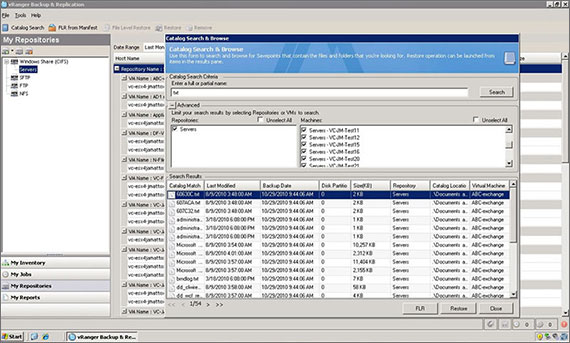
- Quickly locate and restore files inside virtual and physical backup
- Replicate key VMware VMs for offsite disaster recovery preparedness
- Deploy simple, scalable data protection for even the largest virtual environments
Features
Installation wizard
Agentless architecture
Direct-to-target design
Deliver the shortest I/O path for fast backup and restoration
Automatic VM discovery
File level restore
Patented Active Block Mapping (ABM)
Resource governing
FIPS certified
Integrated EMC Data Domain boost
Improve backup speed by enabling Data Domain to distribute parts of the deduplication process to the client
Integration with QoreStor®
Tour
Catalog feature
Specifications
- ESX(i) Server
- 6.0 (all updates)
- 6.5 (all updates)
- 6.7 (all updates)
- 7.0
Support for backup on ESXi requires VMware’s vStorage API.
- vCenter Server
- 6.0 (all updates)
- 6.5 (all updates)
- 6.7 (all updates)
- 7.0
- VMware vCloud support
- VMware Virtual SAN support
- VMware Virtual Volumes
- VMware Storage Profiles
- VMware DRS cluster support
- VMware VMXNET3 networking support for 10Gbe
- Hyper-V platforms
- Windows Server 2012
- Windows Server 2012 R2
- Windows Server 2016
- Windows Server 2019
- Hyper-V System Center Virtual Machine Manager (SCVMM)
- Supported Guest OSs
Any guest OS that is supported by VMware or Hyper-V.
- CPU
Four cores or four vCPUs
- RAM
4 GB
- Storage
4 GB
- Operating system
- Windows Server 2008 R2 SP1 (64-Bit)
- Windows Server 2012 (64-Bit)
- Windows Server 2012 R2 (64-Bit)
- Windows Server 2016
- Windows Server 2019