
Change Auditor for SharePoint
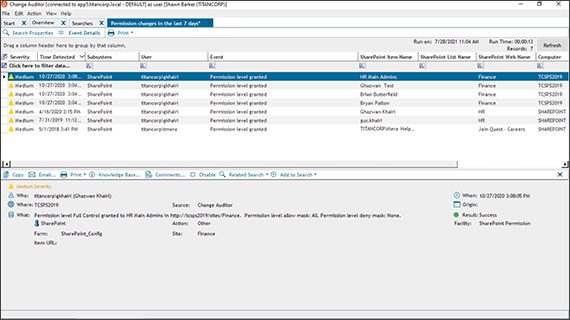
Key Benefits
Hybrid environment auditing
Centralized SharePoint security auditing
Server configuration auditing
SharePoint audit reports at-a-glance
Event filters
Real-time alerts on the move
SIEM integration
Rapid reporting
Features
Security timelines
Improved security insights
Related searches
Superior auditing engine
Stevie Awards 2018 People’s Choice winner
Specifications
There are specific system requirements for the Change Auditor coordinator (server-side), Change Auditor client (client-side), Change Auditor agent (server-side), and the Change Auditor workstation and web client (optional components). For a full list of system requirements and required permissions for all components and target systems that can be audited by Change Auditor please refer to the Change Auditor Release Notes.
The Change Auditor coordinator is responsible for fulfilling client and agent requests and for generating alerts.
- Processor
Quad core Intel® Core™ i7 equivalent or better
- Memory
Minimum: 8 GB RAM or better
Recommended: 32 GB RAM or better
- SQL Server
SQL databases supported up to the following versions:
- Microsoft SQL Server 2022
- Microsoft SQL Server 2016 SP3
- Microsoft SQL Server 2017
- Microsoft SQL Server 2019
- Azure SQL Managed Instance (PaaS) with SQL authentication or Azure Active Directory authentication
NOTE: Performance may vary depending on network configuration, topology, and Azure SQL Managed Instance configuration.
NOTE: Change Auditor supports SQL AlwaysOn Availability Groups, SQL Clusters, and databases that have row and page compression applied.
- Operating system
Installation platforms (x64) supported up to the following versions:
- Windows Server 2016
- Windows Server 2019
- Windows Server 2022
- Windows Server 2025
NOTE: Microsoft Windows Data Access Components (MDAC) must be enabled. (MDAC is part of the operating system and enabled by default.)
- Coordinator software and configuration
For the best performance, Quest strongly recommends:
- Install the Change Auditor coordinator on a dedicated member server.
- The Change Auditor database should be configured on a separate, dedicated SQL server instance.
NOTE: Microsoft ODBC Driver 17 for SQL Server is required when the Change Auditor database resides on Azure SQL Managed Instance and Azure Active Directory authentication is selected.
NOTE: Do NOT pre-allocate a fixed size for the Change Auditor database.
In addition, the following software/configuration is required:
- The coordinator must have LDAP and GC connectivity to all domain controllers in the local domain and the forest root domain.
- x64 version of Microsoft’s .NET Framework 4.8
- x64 version of Microsoft XML Parser (MSXML) 6.0
- x64 version of Microsoft SQLXML 4.0
- Coordinator footprint
- Estimated hard disk space used: 1 GB.
- Coordinator RAM usage is highly dependent on the environment, number of agent connections, and event volume.
- Estimated database size will vary depending on the number of agents deployed and audited events captured.
Additional Account Coordinator minimum permissions required, please see Change Auditor Installation Guide .